Thursday, October 8, 2026

Praise for the FritzBox

The FritBox 7490 is amazing

I've had my FritzBox 7490 for ... 12 years now. It ran my 8MBit ADSL2 in 2013 or 2014. It's so old that when I bought it, I got DECT phone handsets, because I still had a (VoIP) landline service!

I still use it in 2026 for my 960MBit/500MBit fibre service and it's more than sufficient. My WiFi is by far and away the limiting factor on network performance now (for devices I don't have on wired Ethernet).

It still gets updates that add meaningful new functionality from AVM too. I just can't say enough good things about it.

Buying or renting a warm, dry house in Wellington: tips for avoiding mold and damp

My notes on buying or renting a warm dry house in Wellington, New Zealand. I haven't prettied this one up, it's a copy of notes I wrote to a friend. Be warned that I am not a professional or expert in this area, this is just my experience.

Lies, it's all lies. For properties for sale they like to wait put them up until summer especially for the dank dark ones. I've seen "sunny and light" places set deep into steep south east facing hills. Right, you can SEE the sunny places on the other side of the hill from your icy damp window maybe...

Thursday, June 11, 2026

Nasal demons: LLM review by a virtual kernel hacker having a bad day is both effective and hilarious

Or, "how I learned about the phrase 'nasal demons' and its relevance to C code review¹.

I landed up asking an LLM tool to review complex, experimental work in progress "in the style of a very prominent Linux kernel developer having a very bad day".

So an out-of-tree extension author gets the rule wrong, the unwind callback dereferences a stack frame that has been unwound, you get nasal demons. And there is no diagnostic.

and

[...] logs the drop count once per minute and zeros it. No cumulative drop counter is exported as a metric — the extension cannot instrument itself. The on-call engineer has to scrape the postgres log to find out the OpenTelemetry pipeline is dropping data, which is a Heller-class irony.

The review was surprisingly good, especially from an statistics engine with delusions of grandeur. The results were hilarious ... but they were also the most useful LLM code review result I've ever managed to obtain.

Friday, August 18, 2023

error: cannot bind non-const lvalue reference ... to an rvalue ...

It took me way too long to figure out, so posting it here. This:
error: cannot bind non-const lvalue reference of type 'int32_t&' {aka 'long int&'} to an rvalue of type 'int32_t' {aka 'long int'}
means: You tried to pass a uint32_t to a method that accepts a reference to int32_t (signed integer). GCC would have to create a temporary to hold the conversion, but passing a temporary by-reference is not allowed. It'd help if the type difference stood out more. But it also shows my C++ has gone very rusty from too many years of using postgres-dialect C and golang.

Saturday, May 22, 2021

Rechargeable Lithium-Ion battery caddy compatible with Lego® Powered Up!® Hub 88009

9V battery caddy for powered up hub
with USB-rechargeable Li-ion battery

The Lego® Powered Up!® Hub 88009 is found in the Powered Up train series amongst other parts. 

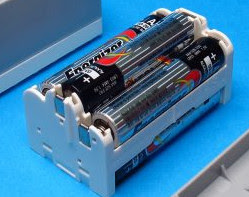
It's a decent part as far as it goes.... except for the batteries. 6xAAA cells, and it doesn't like NiMH rechargeables much.

So I designed a replacement 3D-printable battery caddy that adapts it to a regular 9V form factor. You can then use with a micro-USB Li-ion rechargeable block battery. No soldering or fiddling with electronics required. See below for details.


Why was this even necessary?

Powered Up battery caddy
Hub battery caddy
Image by The Brothers Brick
For some insane reason Lego decided to make it take 6 (yes, six!) AAA batteries to supply its 9V nominal voltage. Worse, it has poor voltage regulation and starts complaining that the batteries are dying when the supply voltage drops to something like 6.5V, and cuts off entirely around 6V. This eats batteries.

Powered Up Hub 88009
The poor voltage regulation means that it prefers 1.5V alkaline dry-cell batteries. If you try to use it with NiMh rechargeable batteries (AAA HR03 / 24H), which tend to top out at 1.25V under load when fully charged, it won't run for long before it decides the batteries are "dead". If your rechargeables aren't in good condition it might not run at all.


Replacement caddy design for rechargeables

Micro-USB rechargeable 9V
battery in commonplace PP3 form factor

The battery gobbling hub annoyed me, so I fixed it to take a single 9V battery (PP3) by designing a 3D-printable replacement battery caddy that you can swap for the original one. It's easy to get micro-USB-rechargeable Lithium-Ion 9V batteries with their own internal voltage regulator, discharge limiter, current limiter, charge controller, etc, so this provides a cheap and easy conversion of your Lego Powered Up hub to a fast-recharging, long-lived power supply. 

An 8.4V or 9.6V NiMH cell should work too, but I don't have any to test.

This caddy design is keyed to prevent insertion of the battery with the wrong polarity. It has some isolating material to prevent the contacts from shorting. It fits the battery securely and neatly, and prevents it rattling around. The contacts with the hub work well. The caddy has the appropriate keying and clip notches to fit into the hub neatly.

Parts and tools required

  • One or more 9V Li-Ion battery packs. You can test with a regular alkaline or NiMH 9V though.

  • Access to a 3D printer for about 4h of print time

  • A little bit of metal plate to cut and bend for the contacts. I recommend 0.5mm copper plate but it's likely you could use brass, aluminium, steel or whatever you have to hand. Exact thickness is not critical.

You will need to 3D print the caddy. 

Download the latest STL from my github repo (at time of writing, lego_powered_up_battery_box_v5.stl).

Printing in PLA should work fine, it's not especially difficult or fiddly. Configure your slicer to print overhangs slowly if you want the clips to function well, otherwise it's just the usual quality/time trade-offs. Dimensional accuracy matters, so avoid filaments that shrink a lot or be prepared to do some trimming. I recommend printing with a brim.

Once printed and trimmed, you will need to make some contacts. Cut two 4mm x 15mm strips of suitable 0.5mm thick metal. Err on the side of narrow (<4mm) not wide. Length isn't critical.

Line up one contact as it will in the caddy, diagonally across from the +ve battery contact across to the centre caddy contact. You will see a little diagonal channel to help you. On one end of the strip, mark and clip the ends so they will sit nicely in the contact pad guide once the strip is inserted. I used side cutters. Then insert one strip into the middle (+ve) contact slot near-vertically and once inserted, turn it around until it's firmly in place.  Glue if desired.

Insert the second strip vertically into the -ve slot. Mark it where it sticks out past the top of the contact cutout. Remove it and fold it over at that point, so it doubles back on itself. Crush it flat at the fold with pliers. Reinsert it and make sure it engages with the little cutout the bottom of the caddy. Glue if desired.

Make sure both contacts fit the battery terminals.

Check the fit of the caddy in the hub box. Trim, shave or sand the keying ridges if required.

Enjoy.

(For the contacts I actually cut a short length of copper pipe then flattened and thinned it out in a rolling press. But it's probably easier to just buy a little copper plate from a hobby shop.)

Related work

Unlike Philo's LiPo conversion this one can be done with an off-the-shelf battery that provides all required voltage regulation and charging circuits internally. Just plug in a micro-USB connector and you're done. (In any case I didn't find his conversion until I'd already completed this one - I originally intended to take the same approach he did with a separate voltage regulation circuit etc, but then found out about these handy all-in-one units).

While writing this article I also stumbled across a eurobricks post that details a simple conversion done by adapting a regular 9V battery clip to the Powered Up contacts layout. I chose not to take this approach mainly because I wanted polarity protection and a nice snug fit where the battery wouldn't rattle around.

Why would Lego design it this way?

The cutoff voltage in the hub is not completely unreasonable - when over-discharged, alkaline batteries are more prone to leaking and splitting, which can potentially be hazardous and/or damage the contacts.

But the hub has a separate battery caddy so it's pretty well protected from leakage. 

So I suspect they designed it for a 5V supply with headroom for a simple linear voltage regulator.

I'm very disappointed that Lego has not released their own rechargeable battery module for these units. It has a swappable internal caddy, and you'd think that a USB-rechargeable battery pack would be a no-brainer product for them to release.

Monday, September 21, 2020

(Failing to) reconfigure host PCI or USB devices for guest kvm libvirt passthrough at runtime: how to unbind built-in kernel drivers from devices without a reboot

I recently had an NVMe drive fault and wanted to check for a firmware update. Western Digital (was SanDisk) in their infinite wisdom only offer firmware for their drives in the form of  ... a Windows management application.

How hard can it really be to run that under Linux?

Moderately, it turns out, and that's by using a Windows VM under libvirt-managed kvm to do it.

First I needed VT-d and the host IOMMU enabled:

  • ensure VT-d was enabled in UEFI firmware (it was). Check grep -oE 'svm|vmx' /proc/cpuinfo | uniq . If there's output, it's available.
  • Run sudo virt-host-validate to check kvm. The line "Checking if IOMMU is enabled by kernel" was marked with a warning.
  • Add intel_iommu=on to my kernel command line and reboot
  • Re-check virt-host-validate, which no longer complains

Then I needed to unbind my NVMe controller and the parent bus from the host so I could pass it through. 

Obviously you can only do this if you're booted off something that won't need the PCI devices you're unbinding. In my case I'm booted from a USB3 HDD.

 Identify the bus path to the NVMe device:

$ sudo lspci -t -nnn -vv -k 
-[0000:00]-+-00.0 Intel Corporation Device [8086:9b61]
+-02.0 Intel Corporation UHD Graphics [8086:9b41]
+-04.0 Intel Corporation Xeon E3-1200 v5/E3-1500 v5/6th Gen Core Processor Thermal Subsystem [8086:1903]
+-08.0 Intel Corporation Xeon E3-1200 v5/v6 / E3-1500 v5 / 6th/7th/8th Gen Core Processor Gaussian Mixture Model [8086:1911]
+-12.0 Intel Corporation Comet Lake Thermal Subsytem [8086:02f9]
+-14.0 Intel Corporation Device [8086:02ed]
+-14.2 Intel Corporation Device [8086:02ef]
+-14.3 Intel Corporation Wireless-AC 9462 [8086:02f0]
+-16.0 Intel Corporation Comet Lake Management Engine Interface [8086:02e0]
+-17.0 Intel Corporation Comet Lake SATA AHCI Controller [8086:02d3]
+-1d.0-[04]----00.0 Realtek Semiconductor Co., Ltd. RTL8111/8168/8411 PCI Express Gigabit Ethernet Controller [10ec:8168]
+-1d.4-[07]----00.0 Sandisk Corp Device [15b7:5005]
+-1f.0 Intel Corporation Device [8086:0284]
+-1f.3 Intel Corporation Device [8086:02c8]
+-1f.4 Intel Corporation Device [8086:02a3]
\-1f.5 Intel Corporation Comet Lake SPI (flash) Controller [8086:02a4]

In this case it's device 15b7:5005 .

I originally tried to pass through just that device after unloading the nvme module, but it failed with errors like

vfio-pci 0000:03:00.0: not ready 65535ms after FLR; giving up

so I landed up having to unbind the parent on the bus too.

First, identify the kernel drivers used, bus IDs, and device IDs. In my case I'll be doing the NVMe SSD device 15b7:5005, the parent SATA AHCI controller 8086:02d3, and the PCIe ethernet controller 10ec:8168 that seems to be a child of the SATA controller.

Use lspci -k -d {{deviceid}} to see the kernel driver bound to each device, and any kernel module(s) registered as supporting it, e.g.:

# lspci -k -d 8086:02d3
00:17.0 SATA controller: Intel Corporation Comet Lake SATA AHCI Controller
    Subsystem: Lenovo Device 5079
    Kernel driver in use: ahci

# lspci -k -d 15b7:5005
07:00.0 Non-Volatile memory controller: Sandisk Corp Device 5005 (rev 01)
    Subsystem: Sandisk Corp Device 5005
    Kernel driver in use: nvme
    Kernel modules: nvme

If it's owned by a module you can often just unload the module to unbind it, e.g.

$ rmmod nvme

but if it's owned by a built-in driver like "ahci" is in my kernel, you can't do that. It doesn't show up in lsmod and cannot be rmmod'd.

Instead you need to use sysfs to unbind it. (You can do this for devices bound to modules too, which is handy if you need the module for something critical for the host OS).

To unbind the ahci driver from the controller on my host, for example, here's what I did:

# ls /sys/module/ahci/drivers/
pci:ahci
# ls "/sys/module/ahci/drivers/pci:ahci/"
0000:00:17.0  bind  module  new_id  remove_id  uevent  unbind


Note that '0000:00:17.0' matches the bus address we saw in lspci? Cool. Now unbind it:

# echo '0000:00:17.0' > "/sys/module/ahci/drivers/pci:ahci/"


Verify everything's unbound now:

# lspci -k -d 8086:02d3 
00:17.0 SATA controller: Intel Corporation Comet Lake SATA AHCI Controller
    Subsystem: Lenovo Device 507
# lspci -k -d 15b7:5005
07:00.0 Non-Volatile memory controller: Sandisk Corp Device 5005 (rev 01)
    Subsystem: Sandisk Corp Device 5005
    Kernel modules: nvme

Now bind it into the vfio-pci driver with:

# modprobe vfio-pci ids=8086:02d3,15b7:5005

Nowwith a bit of luck it can be attached to a kvm so it's accessible inside the guest. 

I used virt-manager for that because libvirt's semi-documented XML-based interface makes me want to scream. Just the guest, "add hardware", "PCI Device", and pick both the NVMe controller and the parent device. I didn't bother with the Ethernet controller, didn't seem to need it.

Sadly, it still won't work:

[ 2641.079391] vfio-pci 0000:07:00.0: vfio_ecap_init: hiding ecap 0x19@0x300
[ 2641.079395] vfio-pci 0000:07:00.0: vfio_ecap_init: hiding ecap 0x1e@0x900
[ 2641.109860] pcieport 0000:00:1d.4: DPC: containment event, status:0x1f11 source:0x0000
[ 2641.109863] pcieport 0000:00:1d.4: DPC: unmasked uncorrectable error detected
[ 2641.109867] pcieport 0000:00:1d.4: AER: PCIe Bus Error: severity=Uncorrected (Non-Fatal), type=Transaction Layer, (Receiver ID)
[ 2641.109868] pcieport 0000:00:1d.4: AER:   device [8086:02b4] error status/mask=00200000/00010000
[ 2641.109869] pcieport 0000:00:1d.4: AER:    [21] ACSViol                (First)
[ 2642.319541] vfio-pci 0000:07:00.0: not ready 1023ms after FLR; waiting
[ 2643.407529] vfio-pci 0000:07:00.0: not ready 2047ms after FLR; waiting
[ 2645.519286] vfio-pci 0000:07:00.0: not ready 4095ms after FLR; waiting
[ 2650.063213] vfio-pci 0000:07:00.0: not ready 8191ms after FLR; waiting
[ 2658.767373] vfio-pci 0000:07:00.0: not ready 16383ms after FLR; waiting
[ 2675.663235] vfio-pci 0000:07:00.0: not ready 32767ms after FLR; waiting
[ 2712.526507] vfio-pci 0000:07:00.0: not ready 65535ms after FLR; giving up
[ 2713.766494] pcieport 0000:00:1d.4: AER: device recovery successful
[ 2714.435994] vfio-pci 0000:07:00.0: vfio_bar_restore: reset recovery - restoring BARs
[ 2764.090284] pcieport 0000:00:1d.4: DPC: containment event, status:0x1f15 source:0x0700
[ 2764.090286] pcieport 0000:00:1d.4: DPC: ERR_FATAL detected
[ 2764.254057] pcieport 0000:00:1d.4: AER: device recovery successful

... followed by a hang of the VM. But hey. It was worth a try.

DPC is "Downstream Port Containment" which is supposed to protect the host from failures in PCI devices by isolating them.

Since this later scrambled my host graphics and I had to force a reboot,

At least now you know how to unbind a driver from a device on the host without a reboot and without messing around with module blacklisting etc.

yay?

Tuesday, September 3, 2019

Giving the Microsoft Wireless Desktop 900 keyboard a power switch

Say whatever else you want about them, Microsoft has always made amazing peripherals hardware. I got their Microsoft Wireless Desktop 900 keyboard/mouse set, which is much the same as the Wireless Keyboard 850 in a kb/mouse bundle. It's no exception - reasonable price, great quality, does exactly what it says with no nonsense and stray LEDs. The keyboard is really flat and convenient.

Unfortunately they took the minimalism a bit too far. The keyboard has no power switch.

Friday, June 28, 2019

Fix Lenovo T460 failure to suspend (sleep) under Linux

My Lenovo T460 with Intel integrated graphics abruptly stopped suspending properly a few weeks ago and it's been driving me nuts. Today I fixed it.

TL;DR: For my specific issue lowering the integrated graphics memory portal from 512MB to 256MB in the UEFI firmware setup ("BIOS setup", F1 boot menu) resolved the issue.

Thursday, June 13, 2019

Updating Lenovo T460 BIOS (UEFI, firmware) without a CD on Linux

Some of Lenovo's newer models come with a firmware update distribution compatible with fwupd so you can just do a firmware update directly from the shell.

This is not the case for the T460, which has a bootable ISO, or a Windows installer that ... creates a bootable ISO.

I couldn't find my USB CD/DVD drive so I landed up finding a workaround.

Thursday, May 2, 2019

Nova Empire Beginners Tips

I've fallen down the rabbit hole of a p2w but still fun if you're free-to-play game called Nova Empire. Despite numerous flaws the game is entertaining and good for when you're pinned under a baby.

However, it has a bunch of traps for beginners. I'd like to share some tips. Currently as a bit of a random assortment. I'll update this occasionally.

Beware, the game is kind of addictive. I play it when I'm pinned under my cranky toddler who wants to use me as a pillow. But it's designed to get its hooks into you and get you playing more, so keep an eye on it. If you're tempted to spend money on it... well, with my software developer hat on I say "go ahead, really, do it." But with my responsible adult hat on I say "the prices are ridiculous for what you get, just be patient, it's a game". If you do want to drop some cash to support them, do it early on in the game to get to level 5 station faster and speed up overall growth.

Saturday, March 2, 2019

Adafruit Gemma, Macbook and the dim red light

My partner recently picked up an Adafruit Gemma as an intro to Arduino and embedded. It has not gone according to plan - it turns out there's a known issue where on some systems the Gemma will fail to enter the bootloader properly. The green power light comes on, but the red light stays dimly and constantly lit. If the reset button is pressed it goes out for a moment then returns.

Trying to program it anyway results in an error like

avrdude: Error: Could not find USBtiny device (0x1781/0xc9f)

The issue seems to be somewhat intermittent, too. Occasionally it works on her Macbook Air. It always works 100% of the time on my Lenovo T460 (Linux). So there's something platform related...

Not a great intro. The Gemma doesn't behave like usual Ardiuno systems - it doesn't expose a USB serial port, for example - so answers are also thinner on the ground.

But I think we found something.

Tuesday, January 8, 2019

Updating the tomu bootloader on the tomu.im EFM32HG


I got a tomu tiny EFM32 that fits in a USB port at lca 2018. More information on Tomu.

Mine came with the serial bootloader (it presents a USB CDC ACM device). I didn't manage to get to the update booth to reflash it at LCA.

I had some difficulty getting the new bootloader on it when I pulled out recently to try to play with it, but since I got it working, here's a short runthrough of how I got it updated.

I use Fedora 28 but this info should apply for any Linux really.

Saturday, November 24, 2018

Childcare management service provider Hubworks! shows us how not to deliver SaaS platform

Late this year, the Department of Education and Training required daycare services including Family Daycare services to transition to a fully-eletronic "Child Care Subsidy System" (CCSS). They supply a list of vetted and approved third party software providers to mediate between DET's CCSS and the FDC provider.

Which brings me to "Hubworks!" This company produces a hosted SaaS that amongst other things caters to family daycare services. You will be shocked to hear that this blog is not a ringing endorsement of their wonderful platform.

They managed to:

  • Produce the worst online enrolment form I have ever seen, and I've seen some truly bad web forms;
  • Have their support service ask my partner to send them her password;
  • Write me off as a parent, because there's only one "Primary Parent";
  • Trumpet on their website about all their amazing Web Based Web 2.0 with Bank Level Security while doing all this.

I reached out to Hubworks via support and internal channels months ago to raise some of these issues. I have been ignored and dismissed. My ticket has been marked "Fixed". So it's time to see if their marketing department cares more.

They've been very happy to direct me to seek support via the educator and the family daycare scheme, as "[t]his is policy of HubWorks! that we always direct parents back to the service as we do not provide assistance to families." From my experience so far, they also do not provide any assistance to the service or educators.

Monday, August 7, 2017

Discriminate against me, please!

I have all the advantages - I'm a healthy able straight young-to-middle-aged white man from an educated 1st world background, etc.

I strongly support "affirmative action" including quota systems to address workplace employment balance and diversity. It's important for all of us, including the highly advantaged and privileged. The recent Google memo kerfuffle has prompted me to explain why I would support things that are seemingly contrary to my own interests. But before you read further, please read this brilliant rebuttal of the above memo. (Tolerance is not a moral precept discusses the philosophy in more depth).

Tuesday, August 9, 2016

Gross overconfidence with public data

The Australian Buerau of Statistics is showing all the signs of being grossly overconfident with every aspect of the 2016 Census, bordering on incompetent.

You've heard all about the data retention in broad terms, but what exactly does it mean? And why could it be bad? After all the data is "anonymized" such that personally identifiable data is removed before being shared, right? Their original non-anonymized versions are encrypted and safe in the hands of ABS administration, so there's nothing to worry about.

Well, it's not that simple.

Lets talk about anonymization vs aggregation, how de-anonymization works, and why the "statistical linkage key" is appallingly flawed.

Wednesday, April 8, 2015

ACMA submission on wholesaler data usage

I've just made a submission to the Australian Communications and Media Authority regarding the 48 hour data usage reporting delay that mobile service wholesalers like Optus impose on their wholesale customers. This can lead to incredibly huge bills with no warning and no way to prevent the bill as part of the service.

The TCP ACMA bill shock provisions that came out of the RTC enquiry were supposed to prevent this, but left a huge loophole by permitting "up to" 48 hours delay in usage alerts and reporting. Optus, at least, appears to treat this as "at least 48 hours", failing to report usage until the 48 hour time. It was a limit, not a target, Optus.

The spend management alerts were supposed to be implemented by small providers by September 2014, but they have the same 48 hour exception:

Spend management
  • Suppliers to send notification alerts of data, voice calls and SMS usage within included value plans no later than 48 hours after the customer has reached data usage and expenditure thresholds of 50, 85 and 100 per cent.
  • Suppliers to include additional notification information about charges applying to included value plans when the customer has exceeded 100 per cent of data or expenditure usage

Industry players are seem to be using this to bypass the intent of the code, which was to provide "access to timely, accurate and comprehensible information about their service"

.

Thursday, July 24, 2014

Active missile defense is NOT the answer for airliners

ABC News (AU) just ran an article about active missile defense on airliners in response to the MH17 incident. It discusses the use of active missile defenses on civilian airliners, but seems to muddle different types of threat and different counter-measure, making it seem like countermeasures might've had some utility for the MH17 incident when that's unlikely to be the case.

Tuesday, July 22, 2014

Jenkins/Stapler: @DataBoundConstructor being ignored, parameter values not passed or null

If you're developing a plugin or patch for Jenkins, which uses the Stapler framework, you might run into issues where you define a new @DataBoundConstructor with an additional parameter, but it just seems to be ignored by the framework.

If so, look for an overridden newInstance method. It's probably being used instead of the constructor annotation.

Monday, March 31, 2014

WifiBaby - First Impressions

I bought a WiFi Baby remote IP camera / baby monitor from wifibaby.net last week. It arrived today, and I wanted to share my first impressions.

Even though WifiBaby don't usually sell outside the USA and Canada they made a special effort to send me a PayPal invoice and they even pointed me at the discount code on their Facebook page (or rather, applied it, then told me they'd done so!). Huge props for this, I've never had better sales service.

Overall, the product its self is quite impressive, with a few disappointments that detract from what is overall a very good product.

It turns out to be closely related to the Y-Cam Cube, specifically a YCW003 VGA Y-Cam Cube. Y-Cam tell me it's not quite the same (different casing, somewhat different specs), and alas isn't firmware-compatible.

The good


It works! This much neglected feature is becoming rare in IT products, and should be savoured when found.

It's well presented, well built, and comes with a really solid mounting bracket. The power brick seems to be good quality, too, and supports 110-240V (though of course it has USA prongs).

Supports WPA2. None of that dodgy OFDM we-claim-it's-secure-but-you-can't-verify-it business of the proprietary camera vendors. (OTOH, see "HTTPs" below, it's not all roses).

The device comes preconfigured for DHCP with a sensible hostname (wifibaby) that makes it easily discovered on most routers, and it can be configured entirely via a web browser. A flash applet on the browser can be used to stream video, with the caveat noted below.

Image quality is excellent, with a high res image in both colour & active infrared. You can choose from several levels of streaming quality for different bandwidth levels. Active infrared quality is excellent, with pretty impressive range without too much foreground over-exposure. I cannot stress how amazing the infrared camera is enough.

Plenty of control over things like whether it uses infrared or not, whether or not it uses the IR cut filter, whether it publishes its address over dynamic DNS, etc.

Once connected to the network, setup is quick and easy with the browser based wizard.

Built-in support for dynamic DNS providers for those who don't have one already, and it even comes preconfigured.

Phone support for those who need it.

Wired Ethernet port. Very handy for maximum quality if you have the house wired anyway.

Multi-user viewing support - works extremely well.

Remote access from off-site (but see caveat below re HTTPs, password security).

No security screws, clips, etc. So if (OK, let's face it, when) I take it apart to get at its guts, it should be easy.

Neither here nor there


Initial setup to get it on the wifi is OK, but a bit dated. It doesn't support WPS (Wifi Protected Setup) for automatic setup, it expects you to plug it in over wired Ethernet and run a desktop application to discover the device. The quickstart guide is good, though, so inexperienced users should be OK. You don't have to use the app, either, you can just find the address it got over DHCP and visit that with a web browser. (Update: it looks like the current Y-Cam firmware supports WPS, but maybe WifiBaby haven't updated to it yet, despite WPS being added in August 2013 in firmware 5.46).

The web UI is crude but functional. Not much attention has gone into usability, but it's simple enough that that's OK.

Some apps support remote control of the infrared feature, etc. Awesome, except you have to buy 3rd party apps to do it, the browser based Flash app doesn't do it.

Ordering from outside the USA is a little bit of a pain and a bit pricey because of shipping, but on the other hand, they did it when they'd normally not ship at all. Try that with Amazon! (Update: Actually, you can).

The price. The base Y-Cam hardware (if I'm right about that) runs a newer firmware that doesn't seem to lack any functionality present in the WifiBaby and adds some more; it also costs 3/4 as much. Of course, you're not getting personal USA based tech support for that, nor the great sales service WifiBaby provide. Pick your priorities I guess.

Not so great


The camera doesn't seem to support HTTPs. Not impressive for a device that supports UPnP to open up a hole in your firewall for remote access - you have to send the credentials in clear text. They should fix this, especially since it defaults to being Internet accessible with a non-randomly-generated password.

The microphone is fairly poor, and it lacks a socket for an external microphone. That's a serious omission.

The infrared cut filter makes a less than quiet "click" noise as it switches in or out. It's not super loud, but it's sharp, sudden, and plenty loud enough to be disturbing. Not good in a baby product. The device does allow you to turn the use of the filter off, though.

There's over two seconds of time lag on the Flash based mobile viewer. This lag doesn't occur to anywhere near the same extent when using mobile devices that stream video from the device.

It doesn't make you generate a new password or enter a new one when you set it up. That'd be OK ... if it didn't also default to opening a hole in the firewall for streaming video. I can understand this one from an ease of support point of view, but think it'd be a lot better to offer a password reset that only worked on the local WLAN or via a wired connection and then encourage the user to generate or enter a better password/phrase.

It doesn't seem to enter much of a low-power mode, producing a fair amount of heat when not actively streaming. I hope it copes OK with the Western Australian summer.

Concerning


In my opinion the vendor doesn't do a very good job of making it clear that the advertised mobile device support requires extra-cost third-party apps. The prices are shown in the apps section of the site, but there's no reference to them being extra cost where the mobile features are listed on the camera product page its self, though the page strongly highlights the features that are only available via those mobile apps. Mobile device logos are prominent, but lack telltale asterisks. It'd be nice to see this made more prominent - or alternately, for the vendor to license these apps and bundle rebrands of them with preconfigured detection of the wifibaby, which would make setup nice and smooth too.

There's no GPL compliance notice in the box, on the camera web page, or in the CD, but it appears to run Linux 2.6.x. I will be taking this up with the vendor. I could be wrong, so don't get too excited, especially as the distributor probably doesn't know anything much about the firmware produced by the manufacturer. (Confirmed by email discussion - I've sent them some information and guides, and will wait to see if anything happens.)

I've sent WifiBaby, and the hardware vendor Y-Cam, links to:


... so we'll see if anything happens there.

Feature wishlist


Talk-back / two-way audio. In a high end baby monitor. I'd really prefer to have this, and many IP cams support it, so it should not be overly hard (as anyone who's never done something always says, right?). They don't claim it supports two-way anywhere, so I didn't expect to have this feature, but it's something I'd like to see appear in a future version.

External microphone port, or a decent quality mike.

Quieter IR cut filter switch over.

HTTPs. Seriously.

Rate-adaptive streaming.

Alternatives


I've since found a similar looking device, which looks like another OEM rebrand of the same IP camera, sold as BabyPing. It's from the same manufacturer according to WifiBaby (update: That's Y-Cam), but unlike the WifiBaby it's a cloud-based device. So, y'know, security/privacy issues there.

The HomeMonitor is also a Y-Cam rebrand. It seems to be another version with a custom firmware reliant on a cloud service.

The Y-Cam cube its self, mentioned above, may be a good option to consider.

Jaycar sells what looks like a previous revision of the same sort of camera for less than a third of the price and has two way audio. Of course, it's probably rather primitive in image quality in comparison, too, and won't come with the same goodies.

Monday, July 15, 2013

On JPA fetch groups

It looks like JPA 2.1 has been released with support for "fetch groups". Hopefully that'll meet the previously identified need for control over JPA fetch behaviour.

It's come too late for me, as I'm no longer working with Java EE or JPA and am feeling badly burned by my experience with the platform after adopting EE 6. Hopefully this'll help others who're struggling with JPA performance issues.